Someone else is currently editing this document
Only one person can work on a document at a time
Diary 2: January - June 1936 Item 54
TRANSCRIPTION
the Wilhelmstrasse people that the maintenance
of the Constitution here was an essential bulwark
of Danzig's Germanism.
Ziehm was German Nationalist Pres. of the Senate
for many years and has close connections with
German government people in consequence, if not
with the N.S. Party. He is not Nazi himself
but a German Nationalist, & has a long record
of service. He suggested I should occasionally
see von N. in Berlin but I explained that while
Germany was not in the League Council
that might create cifficulties.
14-3-36. League Council met in London, and after
hearing France & Belgium, invited Germany
to be represented. It will be very
difficult for Hitler to refuse.
A small bridge dinner, Robinsons,
von Radowitz's, Prati (Italian) & Mme Gorka
(Polish). Von R. much more cheerful.
15-3-36. Heavy snow. Shamrock sent by the
Blythes. Lawless, has arrived to help in
the office. Says he was not sure when he left
London if the international situation would
prevent him from ever reaching Danzig.
(His father was Irish; a relative of our poet Emily
Lawless).
Tea with Noë, who showed me a letter written
by him to a friend in Geneva, prophesying the
outcome of the German situation as the rise of an
extreme radical party, on the right wing of Nationalism,
Language(s) of Transcription
LOCATION
Gdańsk (Poland) (54.3612, 18.5499)
Story Location
ABOUT THIS DOCUMENT
Document Date

Document Type
Document Description
Language of Description
Keywords
External Web Resources
People
Konstantin von Neurath
Description: German Foreign Minister, Ambassador and Reich Protector in Bohemia and Moravia
Wikidata Reference: Q153421
STORY INFORMATION
Title
Diary 2: January - June 1936
Creator
Lester | Seán | 1888-1959
Contributor
Seán Lester
Lester, Seán, 1888-1959
Date
16 January 1936-26 June 1936
Type
Text
Rights
This collection has been digitised and made available by Dublin City University Library. Please credit Dublin City University Library when using these images, creativecommons.org/licenses/by/4.0/
Language
eng
Identifier
#ns06hv59h
LandingPage
https://www.europeana.eu/item/707/_ns06hv59hCountry
Ireland
DatasetName
707__Dublin_City_University
Begin
1936-05-01
End
1937-02-28
Language
en
Created
2022-03-23T16:13:34.244Z
2022-03-23T16:13:37.556367Z
2022-03-23T16:13:37.556839Z
Story Description
Handwritten and typed diary entries relating to Lester's time as High Commissioner of the League of Nations in Danzig. Includes telegram from Bishop Edward O'Rourke, Catholic Bishop of Danzig, to Lester dated 17 March 1936 with best wishes for St Patrick's Day, and letter from the Danzig Police President dated 21 March 1936, inviting Lester to the opening of the Danzig Trophy Show.


TRANSCRIPTION
LOCATION
DESCRIPTION
PEOPLE
STORY INFO
TUTORIAL
the Wilhelmstrasse people that the maintenance
of the Constitution here was an essential bulwark
of Danzig's Germanism.
Ziehm was German Nationalist Pres. of the Senate
for many years and has close connections with
German government people in consequence, if not
with the N.S. Party. He is not Nazi himself
but a German Nationalist, & has a long record
of service. He suggested I should occasionally
see von N. in Berlin but I explained that while
Germany was not in the League Council
that might create cifficulties.
14-3-36. League Council met in London, and after
hearing France & Belgium, invited Germany
to be represented. It will be very
difficult for Hitler to refuse.
A small bridge dinner, Robinsons,
von Radowitz's, Prati (Italian) & Mme Gorka
(Polish). Von R. much more cheerful.
15-3-36. Heavy snow. Shamrock sent by the
Blythes. Lawless, has arrived to help in
the office. Says he was not sure when he left
London if the international situation would
prevent him from ever reaching Danzig.
(His father was Irish; a relative of our poet Emily
Lawless).
Tea with Noë, who showed me a letter written
by him to a friend in Geneva, prophesying the
outcome of the German situation as the rise of an
extreme radical party, on the right wing of Nationalism,
- English (English)
the Wilhelmstrasse people that the maintenance
of the Constitution here was an essential bulwark
of Danzig's Germanism.
Ziehm was German Nationalist Pres. of the Senate
for many years and has close connections with
German government people in consequence, if not
with the N.S. Party. He is not Nazi himself
but a German Nationalist, & has a long record
of service. He suggested I should occasionally
see von N. in Berlin but I explained that while
Germany was not in the League Council
that might create cifficulties.
14-3-36. League Council met in London, and after
hearing France & Belgium, invited Germany
to be represented. It will be very
difficult for Hitler to refuse.
A small bridge dinner, Robinsons,
von Radowitz's, Prati (Italian) & Mme Gorka
(Polish). Von R. much more cheerful.
15-3-36. Heavy snow. Shamrock sent by the
Blythes. Lawless, has arrived to help in
the office. Says he was not sure when he left
London if the international situation would
prevent him from ever reaching Danzig.
(His father was Irish; a relative of our poet Emily
Lawless).
Tea with Noë, who showed me a letter written
by him to a friend in Geneva, prophesying the
outcome of the German situation as the rise of an
extreme radical party, on the right wing of Nationalism,
Language(s) of Transcription
English Translation
Transcription History
the Wilhelmstrasse people that the maintenance of the Constitution here was an essential bulwark of Danzig's Germanism. Ziehm was German Nationalist Pres. of the Senate for many years and has close connections with German government people in consequence, if not with the N.S. Party. He is not Nazi himself but a German Nationalist, & has a long record of service. He suggested I should occasionally see von N. in Berlin but I explained that while Germany was not in the League Council that might create cifficulties. 14-3-36. League Council met in London, and after hearing France & Belgium, invited Germany to be represented. It will be very difficult for Hitler to refuse. A small bridge dinner, Robinsons, von Radowitz's, Prati (Italian) & Mme Gorka (Polish). Von R. much more cheerful. 15-3-36. Heavy snow. Shamrock sent by the Blythes. Lawless, has arrived to help in the office. Says he was not sure when he left London if the international situation would prevent him from ever reaching Danzig. (His father was Irish; a relative of our poet Emily Lawless). Tea with Noë, who showed me a letter written by him to a friend in Geneva, prophesying the outcome of the German situation as the rise of an extreme radical party, on the right wing of Nationalism,
English Translation
Automatically Identified Enrichments
Verify Automatically Identified Enrichments
Verify Automatically Identified Locations
Verify Automatically Identified Persons
Enrichment Mode
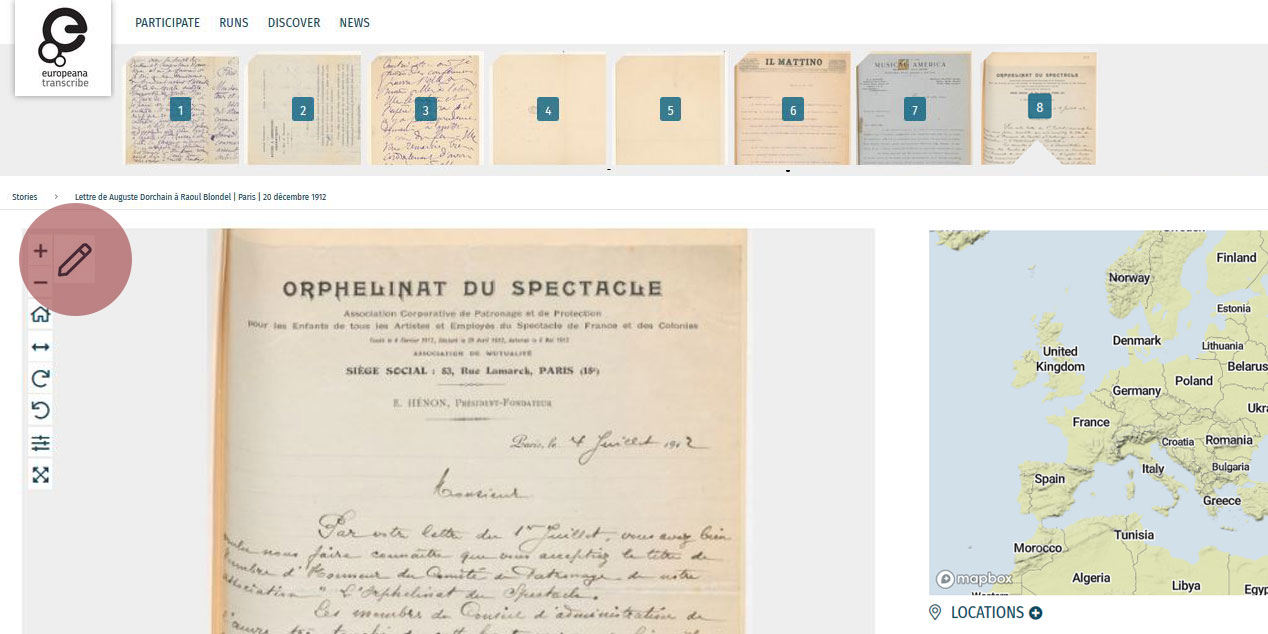
Edit your workspace view by using the top-right menu.
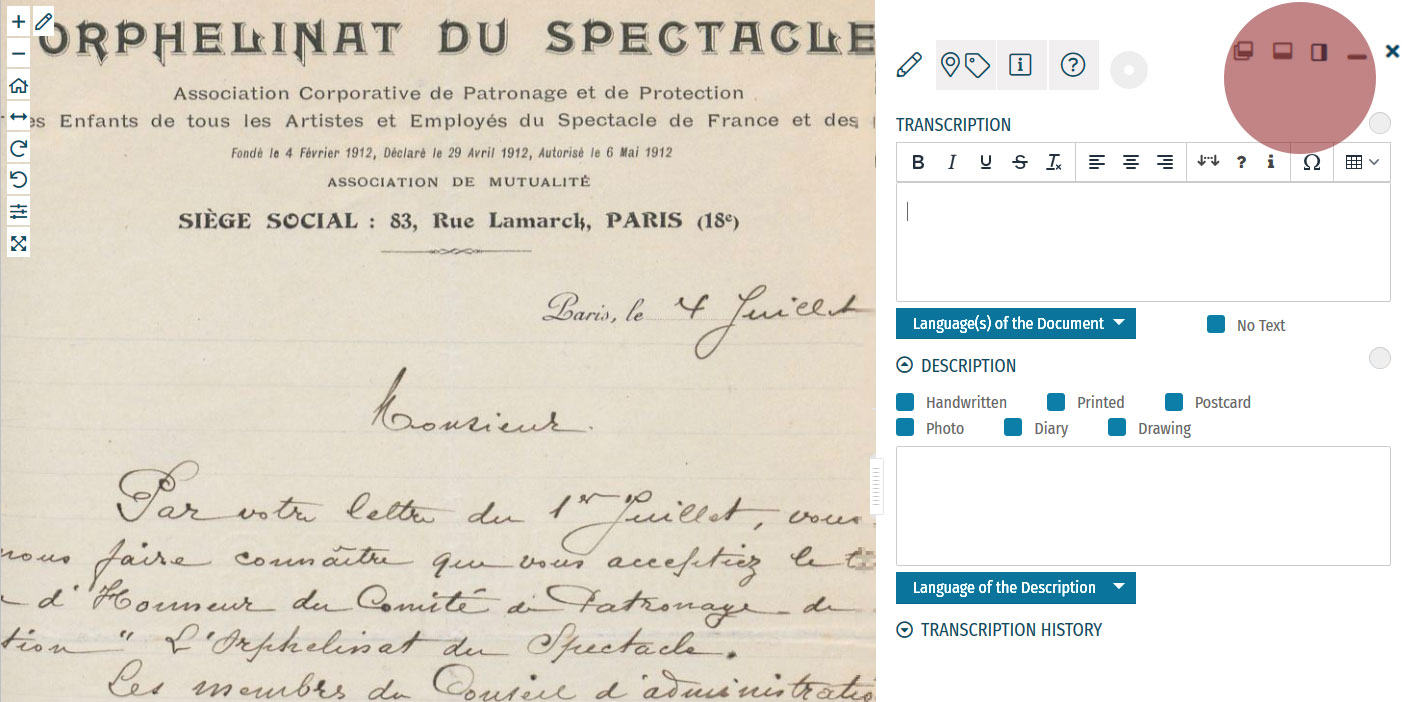
You can have the white Activity Panel docked to the right (default) , to the bottom , or as an independent overlay . If you just want to view the image, you can hide the panel using the minimise button , and then re-open it with the pen button. Adjust the size and position of your Activity Panel according to your preferences.
You enrich documents by following a step-by-step process.
Make sure you regularly save your enrichments in each step to avoid the risk of losing your work.
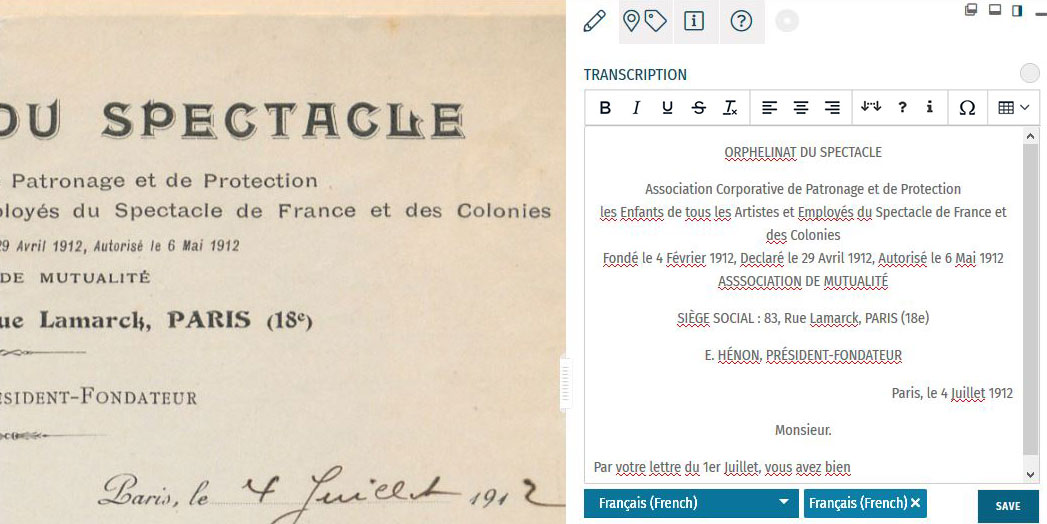
Step 1: Transcription
To start a transcription, select the transcription tab at the top menu of the Activity Panel. Click inside the box underneath the heading TRANSCRIPTION and start writing your transcription. When needed, use the toolbar to format your text and to add special characters and tables. A guide to the transcription toolbar is available in the Formatting section of this tutorial.
Identify the language(s) of the text using the dropdown list under the transcription box. You can select multiple languages at once.
If the item has no text to transcribe, tick the checkbox ‘No Text’.
Once you have finished your transcription, click SAVE.
Step 2: Description
You can add a description to the item underneath the Transcription section.
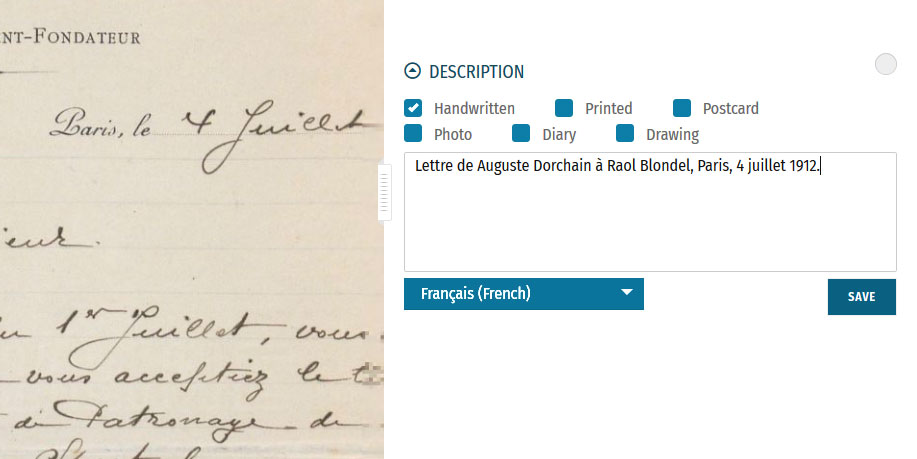
The first task is to identify what type of document the item is: a handwritten or printed document, a postcard, photo, drawing and/or part of a diary. Tick the category which best applies to the item. Multiple categories can be selected at once.
The second task is to write a description of the contents. Click inside the box underneath the heading DESCRIPTION. Here, you can write what the item is, what it is about, and specify the images and objects that appear in the item.
Identify the language of the description text that you wrote using the dropdown list underneath. You can only select one language.
Once you have finished your description, click SAVE.
Step 3: Location
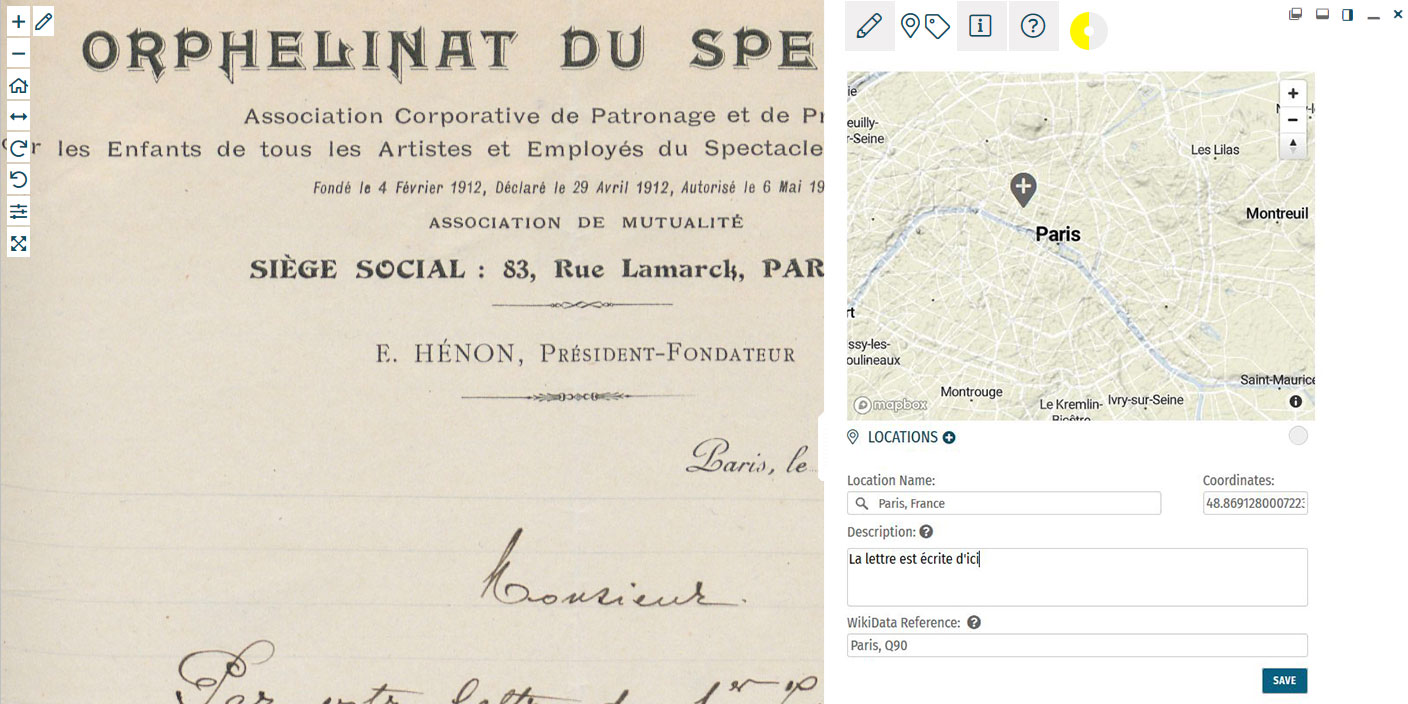
If you find a location mentioned or recognise a place in the item, you can create a geotag and pin it to the item map. Multiple locations can be attached to the item. To tag locations, select the tagging tab at the top menu of the Activity Panel. Click the plus next to the heading LOCATIONS. Type the location into the search bar and select the result that best applies. A new pin will be placed into the map. The location name should be a clear georeference, e.g. a country, city or address. Make adjustments to the location name if necessary. You can also adjust the position of the pin by dragging it on the map. If you want to add further details to the location, you can write a (short) description. This could include extra information about the geotag (e.g. the building name or a significant event that took place at the location) or the relevance of the place to the item (e.g. the hometown of the author). You can also add a Wikidata reference to link the location to a stable source. Search for the reference using the Wikidata fields. Once you have finished your location tag, click SAVE. You can find the place(s) tagged to the item in grey at the bottom of the Location(s) section.Step 4: Tagging
Below the Locations section is the Tagging section, where you can add the following annotations:
 Document Date:
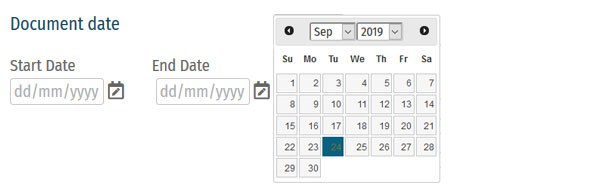
Here, you can add dates that correspond to the item. This could include the dates mentioned in the text (e.g. in diary pages), the date of a related historical event (e.g. the end of WWI), or when the item was created (e.g. from a dated signature on an illustration). You can either define this as a single date or as a longer time frame.
To tag dates to the item, write the start and end dates in DD/MM/YYYY format in the fields or select the dates by clicking on the calendar.
If you only have one date to add, insert the same date into both start and end fields.
If you don’t know the exact days, you can also tag the date on the scale of months (MM/YYYY) or years (YYYY).
Once you have finished your date tag, click SAVE DATE.
 People:
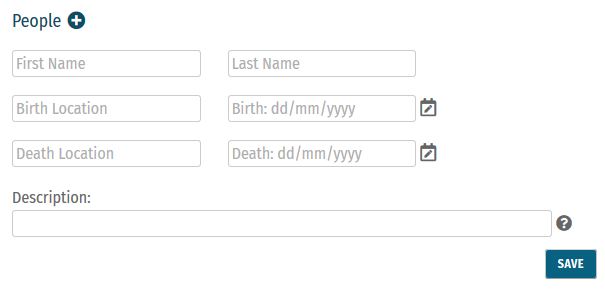
People mentioned as creators or subjects in the item can also be tagged. Depending on the information you might have, you can enter the person’s first and last names, as well as their dates of birth and death. There is also the option to write a short description of the person, explaining who they are or their relevance to the item, e.g. the person’s occupation or their relation to another tagged person.
Multiple people can be tagged to one item.
Once you have finished your person tag, click SAVE.
 Keywords:
Here, you can freely add keywords related to the topic and content of the item. This could include particular themes (e.g. art, music, war), subjects (e.g. children, cooking, France), or particular historical affiliations (e.g. 20th century, Austro-Hungarian Empire, Fall of the Iron Curtain).
Multiple keywords can be added and they can be written in any language.
Write your keyword tag into the field and click SAVE.
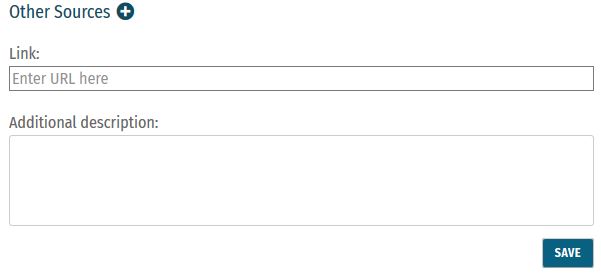 Other Sources:
External websites with information about the item’s content can be linked here. This could include links to further data about a person mentioned, a particular historical event or links to digital versions of newspapers that appear in photos or clippings in a notebook.
To add a link, click the plus next to the heading ‘Other Sources’. Enter the URL into the Link field, and write a short description of this link in the Additional Description field.
Multiple links can be tagged to one item.
Once you have finished your tag, click SAVE.
Step 5: Mark for Review
Once you have saved your contribution, the task will automatically change to the Edit status. If you think the task is finished, you can mark it for review. Note that you have to be at Runner level or above to do this (see: Miles and Levels). Click on the yellow circle next to the section heading and select Review in the list that appears. The task now needs to go under Review by another volunteer.Formatting
 Use the toolbar to format your Transcription text or to add extra details to it.
You can format your text using the various styles and alignment tools:
Use bold for headings, and italics, underline and
Use the toolbar to format your Transcription text or to add extra details to it.
You can format your text using the various styles and alignment tools:
Use bold for headings, and italics, underline and  button to remove any formatting changes.
Review
 All enrichments need to be edited and reviewed by more than one volunteer to ensure that they are as accurate as possible.
Only Sprinters and Champions can edit tasks in the Review stage and mark them as Complete. (see: Miles and Levels)
You can review a task (Transcription, Description, Locations, or Tagging) when the circle next to the heading is coloured orange .
During the review process, pay close attention to the following requirements:
All enrichments need to be edited and reviewed by more than one volunteer to ensure that they are as accurate as possible.
Only Sprinters and Champions can edit tasks in the Review stage and mark them as Complete. (see: Miles and Levels)
You can review a task (Transcription, Description, Locations, or Tagging) when the circle next to the heading is coloured orange .
During the review process, pay close attention to the following requirements:
-
- Transcription: The complete text in the item has been properly transcribed and the transcription is formatted as accurately as possible. The correct language(s) are selected and the transcription contains no missing or unclear icons.
-
- Description: The description is accurate and detailed (especially items without text to transcribe, e.g. photos), and the appropriate categories have been ticked.
-
- Location(s): All locations have been correctly tagged. The location name is accurate and matches the coordinates and the pin on the map. The description is clear and concise, and the Wikidata reference (if any) is correct.
-
- Tagging: Document dates are completed and as precise as possible. All mentioned people are tagged and their data is correct. All added keywords are applicable to the item, and other sources have accurate information and functioning links.
Completion Statuses
| GREY |
| 1. NOT STARTED |
| Tasks have not been started. |
| YELLOW |
| 2. EDIT MODE |
| Tasks have been started, but not yet finished. Additions and edits can still be made. |
| ORANGE |
| 3. REVIEW |
| Tasks are finished, but need final review by Sprinter or Champion transcribers. |
| GREEN |
| 4. COMPLETED |
| Tasks have been fully completed and reviewed. No further changes need to be made. |
Miles and Levels
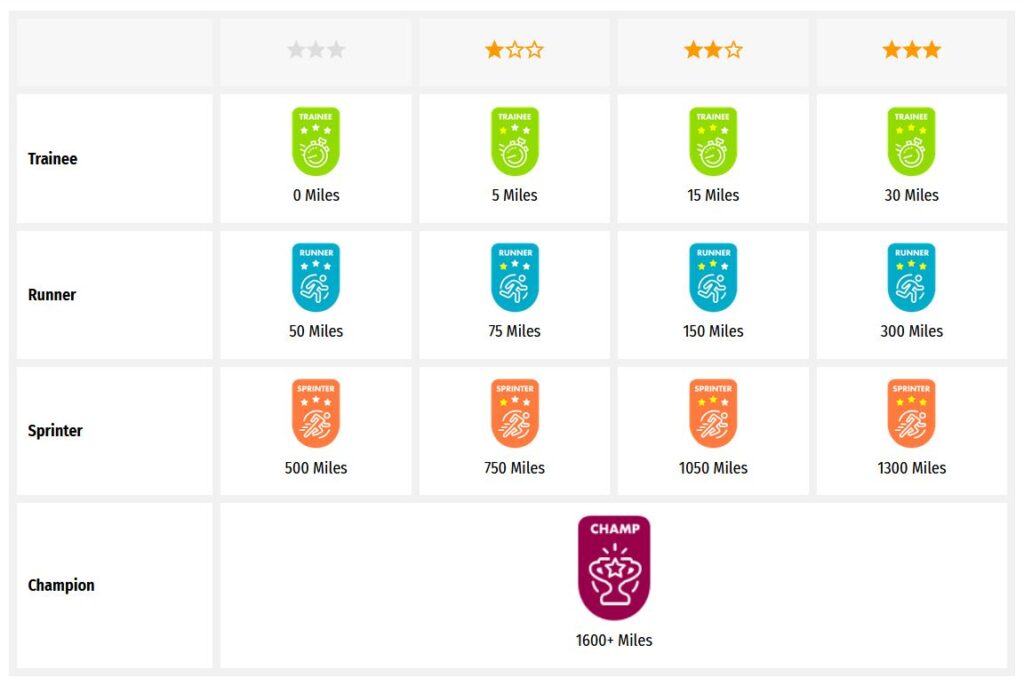
Transcribathon is a competitive marathon. You do not enrich documents alone, but compete and work with other volunteers to ensure the quality of your work. When you first create a Transcribathon account, you only have the ability to start and edit tasks. The more you enrich documents, the closer you become to advancing to a higher level, which can unlock abilities like reviewing and completing tasks.| Level | Abilities |
|---|---|
| Trainee | Basic abilities: start and edit tasks |
| Runner | Basic abilities, mark finished tasks for review |
| Sprinter | All Runner abilities, mark reviewed annotations as completed |
| Champion | All Sprinter abilities, mark reviewed transcriptions as completed |
| Tasks | Miles Received |
|---|---|
| Transcription | 1 Mile for every 300 characters transcribed |
| Description | 1 Mile for every 5 Descriptions added |
| Location | 1 Mile for every 5 Locations added |
| Tagging | 1 Mile for every 5 Tags added |
| Reviewing | 1 Mile for every 10 items marked as complete |